AI applications are becoming part of everyday software, from customer support platforms and content tools to analytics systems and business automation. Behind many of these applications are APIs that allow developers to connect artificial intelligence capabilities with websites, mobile apps, and internal business systems.
AI API documentation is the technical guide that explains how developers can use these APIs correctly. Good documentation reduces development time, prevents integration mistakes, and helps teams understand how an AI service works.Ultimate Guide to AI Development Tools
What Is AI API Documentation?
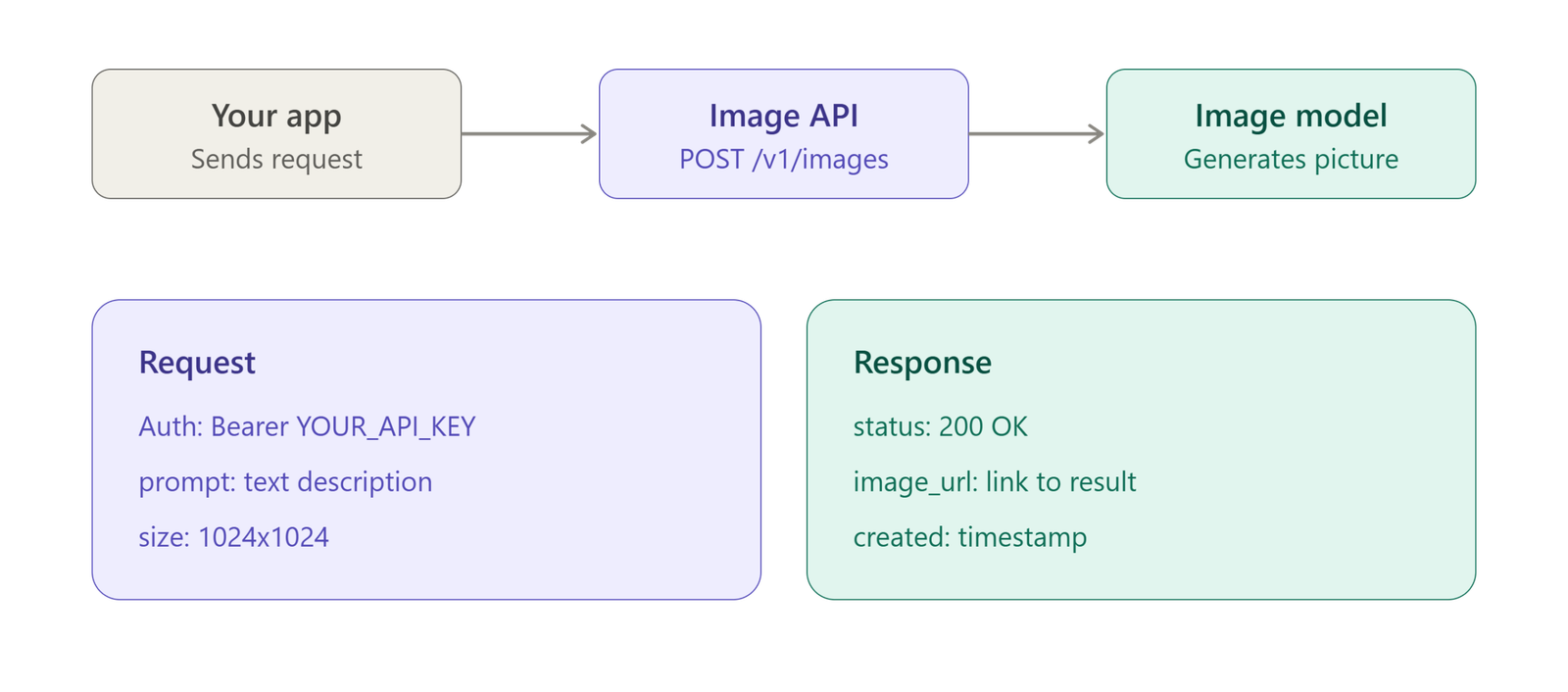
AI API documentation is a structured reference that explains how to connect to and use an artificial intelligence API. It typically covers authentication, endpoints, request parameters, response formats, error handling, examples, usage limits, and available features.
For developers, documentation acts as a roadmap. Instead of figuring out an API through trial and error, they can follow documented instructions and integrate the required AI functionality more efficiently.
A useful AI API guide should be easy to scan and detailed enough to answer common technical questions without unnecessary complexity.
Why AI API Documentation Matters
AI APIs can involve multiple models, parameters, authentication methods, and response structures. Without clear documentation, even a simple integration can become frustrating.
Faster API Integration
Developers need to know exactly where to send requests and what information to include. Clear API documentation provides this information in an organized format.
Well-written instructions can shorten the time required to move from an initial API test to a working application.
Fewer Development Errors
Incorrect parameters, missing authentication headers, and unexpected response formats can cause integration problems. Detailed documentation helps developers avoid these common mistakes.
Examples are particularly useful because they show how theoretical instructions should be implemented in real code.
Better Developer Experience
Developer experience has become an important part of software adoption. If developers cannot understand an API quickly, they may abandon the integration.
An accessible AI developer documentation resource should provide clear explanations, practical examples, and predictable navigation.
Key Components of AI API Documentation
Professional API documentation usually contains several essential sections.
Authentication
The authentication section explains how applications identify themselves when making API requests.
It may describe API keys, tokens, authorization headers, or other security mechanisms. Documentation should also explain where credentials belong and how developers should protect them.
Sensitive credentials should never be embedded directly into publicly accessible frontend code.
API Endpoints
Endpoints define where developers send requests to access particular AI capabilities.
Each endpoint should clearly identify:
- HTTP method
- Endpoint URL
- Required headers
- Request parameters
- Request body
- Response structure
- Possible errors
A consistent format makes an AI API reference much easier to navigate.
Request and Response Examples
Examples are one of the most valuable parts of API documentation.
A request example can demonstrate how developers send prompts, files, structured data, or configuration parameters. A response example shows what the application should expect after a successful request.
Examples should use realistic but simple scenarios so developers can adapt them to their own projects.
Documenting AI Models and Parameters
AI APIs often provide access to multiple models or AI capabilities. Documentation should explain what each option is designed to do rather than simply listing model names.
For example, developers may need information about:
- Text generation
- Image generation
- Speech processing
- Embeddings
- Classification
- Summarization
- Structured outputs
- Tool or function calling
Parameters also require careful explanation. Documentation should describe what a parameter controls, its accepted values, default behavior, and situations where changing it may affect results.
This is especially important for AI systems because small configuration changes can influence output quality, cost, latency, or consistency.
Error Handling and Troubleshooting
No API integration works perfectly all the time. Good documentation should explain common errors and provide practical solutions.
Examples may include authentication failures, invalid parameters, rate-limit responses, unavailable services, malformed requests, or unsupported inputs.
A useful AI API documentation platform should explain errors in plain technical language rather than displaying unexplained error codes.
A troubleshooting section can also answer common questions such as:
- Why is my API request failing?
- Why am I receiving an empty response?
- What happens when the usage limit is reached?
- How should temporary failures be handled?
- What should an application do after a timeout?
Code Examples and SDK Documentation
Developers often prefer working examples over lengthy theoretical explanations. Providing code snippets in popular programming languages can make an API significantly easier to adopt.
Documentation may include examples for Python, JavaScript, TypeScript, Java, PHP, or other commonly used languages.
Where official SDKs are available, documentation should explain installation, initialization, basic requests, configuration, and error handling.
A simple progression works well:
- Install the SDK.
- Configure authentication.
- Make a basic API request.
- Process the response.
- Handle errors.
- Expand the integration for production use.
Best Practices for Writing AI API Documentation
Effective documentation should be accurate, current, and organized around developer needs.
Keep Instructions Simple
Avoid unnecessary technical jargon. Explain complicated concepts using short sections and practical examples.
Maintain Consistency
Use consistent terminology for endpoints, parameters, responses, authentication methods, and models. Inconsistent naming can create unnecessary confusion.
Include Real Use Cases
Developers understand AI capabilities more easily when documentation connects features to practical applications such as chatbots, automation, search, data analysis, or content processing.
Update Documentation Regularly
AI platforms can change quickly. Models, endpoints, pricing structures, limits, and parameters may evolve.
Outdated documentation can be worse than incomplete documentation because developers may follow instructions that no longer work.
Versioning is therefore an important part of maintaining reliable AI API documentation.
AI API Documentation for Production Applications
Basic API instructions are enough for experimentation, but production applications require additional information.
Documentation should address rate limits, scalability, security considerations, retries, timeouts, monitoring, and performance.
Developers also need guidance about handling sensitive information and minimizing unnecessary data exposure when sending requests to an AI service.
For larger applications, documentation can include architectural examples that demonstrate how an AI API fits into an existing software stack.
Conclusion
AI API documentation is more than a collection of technical reference pages. It is a practical resource that helps developers understand, test, integrate, and maintain AI-powered functionality.
Strong documentation explains authentication, endpoints, parameters, models, responses, errors, SDKs, and real-world implementation patterns. It also keeps developers informed about changes as AI technology evolves.
For organizations building AI products or providing AI services, investing in clear and regularly updated API documentation can make integrations faster, reduce technical friction, and create a better developer experience.






One thought on “AI API Documentation: A Complete Guide for Developers”