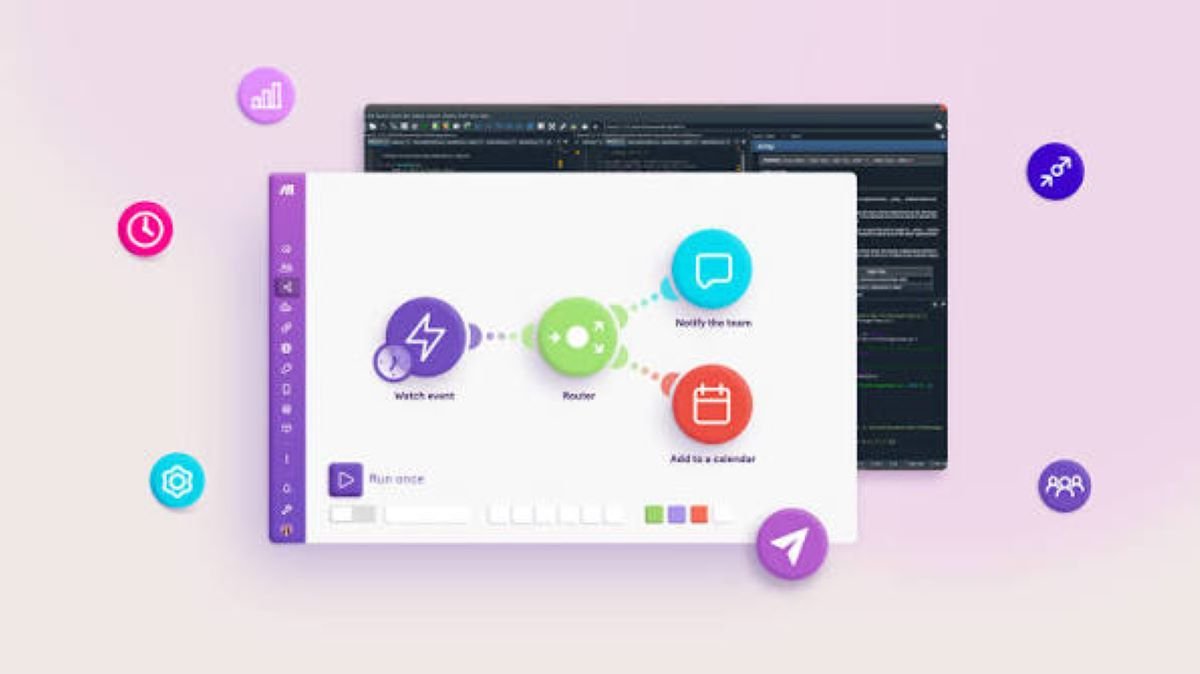
AI workflow automation without coding is a modern approach to automating business tasks and processes without requiring users to write programming code. Instead of relying on developers, APIs, scripts, or complicated technical configurations, users can create automated workflows through visual interfaces, simple instructions, and increasingly, natural language. An AI-powered automation platform can understand what a user wants to accomplish, identify the required steps, connect supported applications, and help build the workflow. For example, a small business owner could describe a process such as, “When a customer fills out our contact form, save the information in our CRM, send a confirmation email, and notify the sales team.” The platform can turn this instruction into a sequence of automated actions. This makes no-code AI workflow automation useful for businesses that want to reduce repetitive work while allowing non-technical employees to participate directly in automation.
How AI Workflow Automation Without Coding Works
Traditional automation often requires technical knowledge. A developer may need to understand APIs, programming languages, authentication methods, databases, webhooks, and application-specific requirements.AI-Native No-Code Workflow Automation
A no-code AI workflow platform changes the process by providing a more accessible interface.
Describe the Desired Process
The first step is identifying what needs to happen. Instead of thinking about programming logic, users can explain the business process in straightforward language.
For example:
“Every time a new customer places an order, update the spreadsheet, send an order confirmation, and create a follow-up task.”
The AI system interprets the request and identifies the major workflow components.
Identify Triggers and Actions
Every workflow normally has a starting event, known as a trigger. This could be a new form submission, incoming email, completed purchase, calendar event, or updated customer record.
After identifying the trigger, the automation platform determines the actions that should follow.
These actions might include sending an email, updating a database, creating a task, posting a notification, or moving information between applications.
Connect Business Applications
Modern businesses use multiple applications every day. A company may use a CRM for customers, an email platform for communication, spreadsheets for reporting, and project-management software for internal tasks.
AI workflow automation without coding can connect these systems through built-in integrations. Users generally select the relevant applications and authorize access rather than manually developing integrations.
Why Businesses Use No-Code AI Automation
The main advantage of no-code workflow automation is accessibility. Automation is no longer limited to people who understand programming.
Reduced Dependence on Developers
Developers are often responsible for complex technical projects, security improvements, software development, and infrastructure. Asking developers to create every small business automation can consume valuable time.
With a no-code AI automation tool, marketing, sales, HR, operations, and customer-support teams can build many workflows themselves.
This allows technical teams to concentrate on projects that require deeper engineering expertise.
Faster Automation Development
Manual workflow configuration can take considerable time when a process contains many steps.
AI can accelerate the initial creation process by interpreting the user’s instructions and generating a workflow structure.
Employees can then review the result, make adjustments, and test it before activation.
Lower Learning Curve
Traditional automation tools can feel complicated to beginners. Terms such as triggers, actions, conditions, webhooks, API requests, and data mapping can create unnecessary barriers.
An AI-powered no-code platform can hide much of this technical complexity behind visual controls and conversational instructions.
Common Use Cases for AI Workflow Automation
AI workflow automation without coding can support almost any department where repetitive digital tasks exist.
Marketing Automation
Marketing teams can automate lead collection, campaign notifications, customer segmentation, content distribution, and follow-up activities.
For example, when someone downloads an ebook, an automated workflow could add the person to a marketing database, send a confirmation message, and create a follow-up task.
Sales Workflow Automation
Sales representatives spend significant time updating CRM records, assigning leads, sending reminders, and managing follow-ups.
AI automation can handle many of these repetitive activities.
A workflow could automatically assign a new lead to a salesperson, update the CRM, and schedule a follow-up reminder based on predefined conditions.
Customer Support Automation
Customer service teams can use automation to categorize incoming requests, assign tickets, notify appropriate employees, and send basic acknowledgments.
AI can also help determine the nature or urgency of a request before routing it to the appropriate team.
Human Resources
HR departments can automate employee onboarding, interview scheduling, document collection, approval requests, and internal notifications.
A no-code workflow can connect forms, email, calendars, document systems, and employee databases without requiring custom software development.
AI Workflow Automation vs. Traditional No-Code Automation
It is important to understand the difference between conventional no-code automation and AI-powered automation.
Traditional no-code tools usually require users to manually construct workflows. Users select a trigger, choose an action, configure fields, and connect each step.
AI workflow automation adds an intelligent layer to this process.
Instead of manually building everything from the beginning, users can describe their desired outcome and let AI generate a starting workflow.
This does not mean traditional visual builders are becoming unnecessary. Visual editing remains valuable because users need control over conditions, permissions, integrations, and individual workflow steps.
The strongest systems combine AI workflow generation with flexible no-code editing.
Important Features to Consider
Businesses should not choose an automation platform based only on whether it advertises AI capabilities.
Natural Language Instructions
A useful AI workflow builder should understand practical business instructions and allow users to refine workflows conversationally.
Application Integrations
The platform should support the applications employees already use. CRM, email, spreadsheets, communication, accounting, project-management, and database integrations can significantly expand automation possibilities.
Conditional Logic
Simple workflows are easy to automate, but real businesses often need rules.
For example, a company might want high-value leads sent directly to a senior salesperson while other leads follow a standard process.
Conditional logic allows one workflow to handle different scenarios.
Monitoring and Error Handling
Automation should not simply run in the background without supervision.
Businesses need visibility into successful executions, failed steps, errors, and unexpected results. Logging and notifications can help teams identify problems quickly.
Security and Permissions
Automation may involve sensitive customer or business information. Companies should understand what data the platform accesses, how permissions work, and which employees can create or modify workflows.
Benefits for Small Businesses
Small businesses can particularly benefit from AI automation without coding because they often operate with limited staff and resources.
A small team may not have a dedicated developer or automation specialist. Employees therefore spend valuable time performing repetitive administrative tasks.
AI-powered workflow automation can help reduce that burden.
For example, a small online store could automate order notifications, customer emails, inventory updates, review requests, and internal alerts.
The objective is not to replace employees. It is to allow them to spend more time on activities that require judgment, creativity, communication, and relationship building.
Limitations and Challenges
Despite its advantages, AI workflow automation is not a magic solution.
AI can misunderstand vague instructions. A request such as “notify the team” does not specify which team, application, notification method, or timing should be used.
Users should therefore provide clear instructions and review AI-generated workflows before activating them.
Integration limitations can also affect automation. If an application does not provide the required integration or permissions, an AI system cannot simply bypass that limitation.
There are also security considerations. Workflows that process financial, customer, employee, or confidential information require careful access management.
The Future of AI Workflow Automation Without Coding
The future of AI workflow automation without coding is likely to become increasingly conversational.
Instead of opening a complicated automation dashboard, users may simply explain a business process and allow AI to create, test, and refine the workflow.
AI systems may also become better at identifying inefficient processes and suggesting automation opportunities.
For example, an AI assistant could analyze repetitive business activities and recommend where automation could save time.
This could transform workflow automation from a technical implementation task into a more accessible business productivity tool.
Conclusion
AI workflow automation without coding makes it possible for businesses to automate repetitive digital processes without requiring traditional programming skills. By combining artificial intelligence, natural language instructions, visual workflow builders, and application integrations, these platforms make automation accessible to a much wider range of users.
The technology can support marketing, sales, customer service, HR, operations, and many other departments. However, businesses should still review automated processes carefully, particularly when sensitive information or important decisions are involved.
The real value of no-code AI automation is simple: employees can describe what they need, build useful workflows faster, and spend less time on repetitive digital tasks.


One thought on “AI Workflow Automation Without Coding”