Small businesses often operate with limited staff, tight budgets, and a long list of repetitive tasks. Managing customer inquiries, sending emails, updating records, creating reports, following up with leads, and organizing daily operations can consume valuable time. An AI workflow generator for small business can help reduce this workload by turning repetitive processes into automated workflows.
Unlike traditional automation tools that may require technical knowledge, modern AI workflow generators allow business owners to describe what they want in simple language. The system can then help design a workflow that connects tasks, applications, data, and AI-powered actions.
What Is an AI Workflow Generator for Small Business?
An AI workflow generator is a software tool that uses artificial intelligence to create business workflows from natural-language instructions or predefined processes.
For example, a small business owner might enter:AI-Native No-Code Workflow Automation
“When a customer submits a contact form, send an acknowledgment email, add the customer to my CRM, and notify the sales team.”
The AI can translate this instruction into a sequence of automated steps.
A typical workflow may include a trigger, several actions, conditions, data processing, and a final outcome. This makes it possible for small businesses to automate processes without building every step manually.
Why Small Businesses Need AI Workflow Automation
Small businesses cannot afford to waste hours on repetitive administrative work. Employees should spend more time serving customers, developing products, generating sales, and solving important problems.
Reduce Repetitive Work
Tasks such as copying information between applications, sending routine emails, updating spreadsheets, and assigning leads can often be automated.
An AI workflow generator can organize these activities into repeatable processes. Once configured, the workflow can operate automatically whenever the required trigger occurs.
Save Time and Operating Costs
Hiring additional employees to handle repetitive tasks is not always practical for a growing company. Automation can increase productivity without requiring a large increase in headcount.
The goal is not simply to replace human work. Instead, AI workflow automation for small businesses can remove unnecessary manual steps and allow employees to focus on higher-value responsibilities.
Improve Consistency
Manual processes can lead to missed follow-ups, incorrect data entry, and inconsistent customer communication.
Automated workflows follow predefined instructions consistently. This can make everyday operations more predictable and reduce avoidable mistakes.
How an AI Workflow Generator Works
Most AI workflow generators follow a relatively simple process.
1. Describe the Process
The user explains the desired workflow using ordinary language. Technical terminology is often unnecessary.
For example:
“Whenever someone books a consultation, add their details to the CRM and send a confirmation email.”
The AI interprets the request and identifies the likely steps.
2. Identify Triggers and Actions
A workflow normally begins with a trigger. This could be a new form submission, incoming email, completed payment, calendar event, or new CRM record.
The system then determines what actions should happen afterward.
For example:
Trigger: New customer inquiry
Action: Save customer information
Action: Send confirmation email
Action: Create sales task
Action: Notify employee
3. Add Conditions
More advanced workflows can include conditional logic.
For instance, a company might want high-value leads to receive immediate attention while lower-priority inquiries follow a standard process.
AI can help create these rules based on information such as customer type, order value, location, or inquiry category.
Common AI Workflows for Small Businesses
An AI workflow generator for small business can support many departments and processes.
Lead Management
When a prospect fills out a form, automation can capture the information, categorize the lead, add it to a CRM, and notify the appropriate salesperson.
Customer Support
AI workflows can classify incoming support requests, identify common questions, generate draft responses, and route complex issues to human employees.
Email Marketing
Businesses can automate customer segmentation, follow-up messages, campaign triggers, and personalized communication based on customer behavior.
Invoice Processing
An AI-powered workflow can extract information from invoices, organize the data, send it for approval, and update accounting records.
Appointment Management
A workflow can automatically confirm bookings, send reminders, update calendars, and notify staff about upcoming appointments.
AI Workflow Generator vs. Traditional Automation
Traditional workflow automation usually requires users to manually select triggers, applications, actions, and conditions.
AI-based systems can simplify this process by allowing users to describe their goals conversationally.
For example, instead of manually creating several automation rules, a business owner can explain:
“Every Monday morning, create a report from last week’s sales data and email it to the management team.”
The AI can help translate the instruction into a structured workflow.
However, AI does not eliminate the need for human review. Businesses should check generated workflows carefully before allowing them to handle important financial, customer, or operational processes.
Benefits of No-Code AI Workflow Automation
A major advantage of modern workflow generators is their no-code approach.
Small business owners may not have developers available to build custom automation systems. A no-code AI workflow platform can make automation accessible through visual builders, natural-language instructions, templates, and integrations.
This can make it easier to connect tools such as:
- CRM platforms
- Email services
- Spreadsheets
- Project management software
- E-commerce platforms
- Communication applications
- Accounting systems
- Customer support tools
The result is a more connected business environment where information can move between systems automatically.
How to Choose an AI Workflow Generator
Not every automation platform is suitable for every small business. Before choosing a tool, consider its integrations, pricing, ease of use, security features, customization options, and scalability.
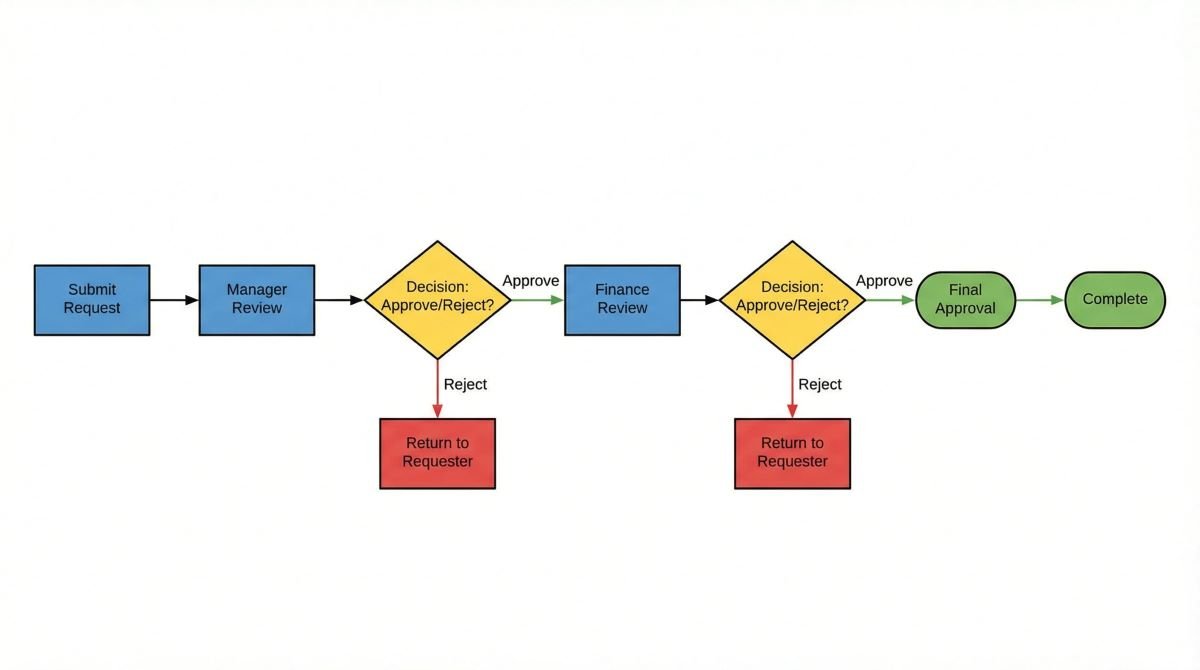
It is also important to examine whether the platform supports human approval steps. Some workflows should not operate completely automatically, particularly those involving payments, sensitive information, or important customer decisions.
Start with simple processes that are repetitive, predictable, and easy to measure.
Best Practices for AI Workflow Automation
The biggest mistake is trying to automate everything at once.
Begin with one process that consumes significant time. Document how the task currently works, identify unnecessary steps, and then build an automated version.
Test the workflow with realistic examples before deploying it. Monitor the results and make adjustments when problems appear.
Businesses should also maintain clear ownership. Someone should be responsible for reviewing important workflows and updating them when business processes change.
The Future of AI Workflow Generation
AI workflow automation is moving toward systems that can understand business goals rather than simply execute fixed instructions. Future workflow platforms are likely to combine natural-language interfaces, intelligent decision-making, data analysis, and multiple business applications in increasingly flexible ways.
For small companies, this creates an opportunity to build efficient operations without investing heavily in complex software development.
Conclusion
An AI workflow generator for small business can turn repetitive processes into practical automated systems. From lead management and customer support to email marketing, invoicing, and appointment scheduling, AI-powered workflows can help businesses save time and improve operational consistency.
The most effective approach is not to automate everything blindly. Start with repetitive tasks where automation provides a clear benefit, test each workflow carefully, and keep humans involved where judgment is important.
For small businesses looking to grow efficiently, AI workflow automation can become a useful foundation for building faster, more organized, and scalable operations.


One thought on “AI Workflow Generator for Small Business: A Practical Guide to Smarter Automation”