
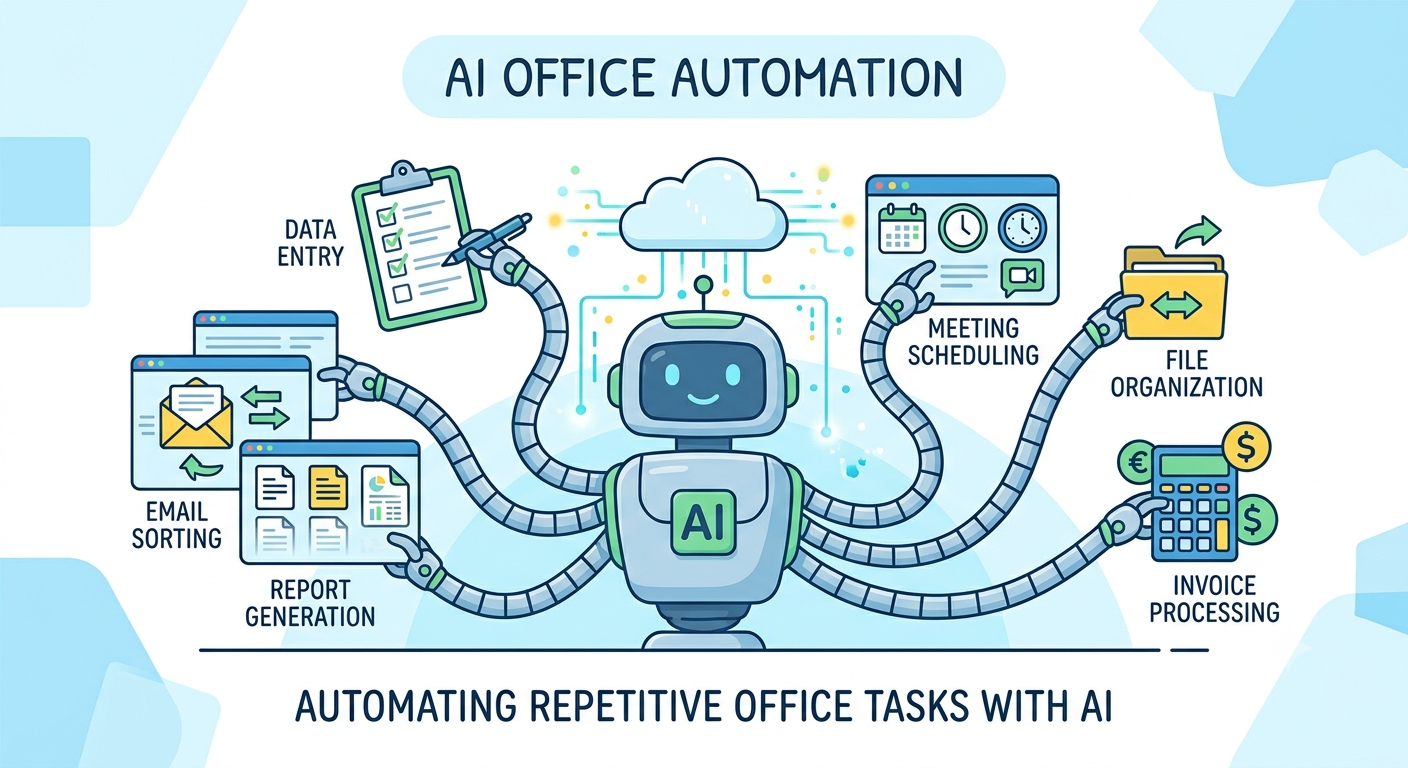
Every office relies on routine tasks to keep daily operations running smoothly. However, manually handling emails, scheduling meetings, processing documents, and entering data can consume hours of valuable work time. Learning how to automate repetitive office tasks with AI helps businesses improve efficiency, reduce errors, and allow employees to focus on strategic, high-value work.
Artificial intelligence has evolved beyond simple automation. Modern AI tools can understand language, analyze documents, organize information, and even make intelligent recommendations. This guide explains how AI automation works, which office tasks can be automated, and the best practices for implementing AI successfully.
What Is AI Office Automation?
AI office automation is the use of artificial intelligence to perform repetitive administrative and operational tasks with minimal human intervention. Unlike traditional automation, AI can learn from data, recognize patterns, process natural language, and improve workflows over time.
Common AI technologies used in office automation include:
- Machine Learning (ML)
- Natural Language Processing (NLP)
- Robotic Process Automation (RPA)
- Intelligent Document Processing (IDP)
- Optical Character Recognition (OCR)
- Predictive Analytics
Together, these technologies streamline business operations while improving speed and accuracy.
Why Businesses Should Automate Repetitive Office Tasks
Manual office work often slows productivity and increases the risk of human error. Employees may spend hours every week performing repetitive activities that AI can complete in minutes.
Key benefits include:
- Increased employee productivity
- Faster business processes
- Reduced operational costs
- Improved data accuracy
- Better collaboration across teams
- Enhanced customer service
- More time for strategic decision-making
By eliminating repetitive work, businesses create a more efficient and productive workplace.
Common Office Tasks That Can Be Automated with AI
Email Management
AI-powered email assistants can:
- Sort incoming emails
- Prioritize important messages
- Flag urgent requests
- Generate automatic replies
- Schedule follow-up reminders
This reduces inbox overload and improves communication efficiency.
Calendar and Meeting Scheduling
AI scheduling assistants automatically:
- Find available meeting times
- Send invitations
- Adjust appointments
- Book conference rooms
- Manage scheduling conflicts
Employees spend less time coordinating calendars and more time on meaningful work.
Data Entry
Manual data entry is one of the most repetitive office tasks.
AI can automatically extract information from:
- Forms
- PDFs
- Invoices
- Contracts
- Receipts
- Emails
The data is then entered into business systems with greater speed and accuracy.
Document Processing
AI simplifies document management by:
- Classifying files
- Extracting key information
- Organizing digital records
- Searching documents instantly
- Identifying missing information
This significantly reduces administrative workload.
Customer Support
AI chatbots handle routine customer inquiries by providing instant responses to frequently asked questions, routing complex requests to human representatives, and collecting customer information before live conversations begin.
This improves response times while reducing support costs.
Invoice Processing
Finance teams can automate:
- Invoice creation
- Payment approvals
- Expense categorization
- Vendor management
- Payment reminders
AI also detects duplicate invoices and unusual transactions that may require review.
How AI Improves Office Productivity
Faster Task Completion
AI processes repetitive tasks in seconds instead of hours, allowing employees to focus on higher-value responsibilities.
Fewer Human Errors
Automated workflows follow predefined rules consistently, reducing mistakes in data entry, calculations, and document processing.
Better Decision-Making
AI analyzes business data to provide insights that help managers make faster and more informed decisions.
Improved Employee Satisfaction
Employees spend less time on repetitive work and more time solving problems, collaborating with colleagues, and contributing creative ideas.
Step-by-Step Guide to Automating Office Tasks with AI
Step 1: Identify Repetitive Work
Begin by reviewing daily operations.
Look for tasks that are:
- Time-consuming
- Rule-based
- Repeated frequently
- Manual
- Prone to errors
These are excellent candidates for automation.
Step 2: Prioritize High-Impact Processes
Not every task should be automated immediately.
Start with workflows that deliver the greatest return on investment, such as:
- Email management
- Invoice processing
- Data entry
- Customer support
- Appointment scheduling
Small improvements often create significant productivity gains.
Step 3: Choose the Right AI Solution
Select AI software that integrates with your existing office applications.
Look for features such as:
- Workflow automation
- Cloud accessibility
- CRM integration
- Document processing
- Security compliance
- Analytics dashboards
A scalable platform supports future business growth.
Step 4: Train Employees
Successful AI implementation depends on employee adoption.
Provide training so staff understand:
- How automation works
- Which tasks remain manual
- How to monitor automated workflows
- When human review is required
AI should enhance employee performance rather than replace human expertise.
Step 5: Test Before Full Deployment
Launch a pilot project before automating the entire office.
Testing helps identify workflow bottlenecks, improve accuracy, and reduce implementation risks.
Step 6: Monitor and Optimize
Automation is an ongoing process.
Track key performance indicators such as:
- Processing speed
- Employee productivity
- Error reduction
- Customer satisfaction
- Cost savings
Regular monitoring ensures workflows continue delivering value.
Best Practices for AI Office Automation
Start with Simple Workflows
Automating straightforward processes first builds confidence and demonstrates measurable results.
Maintain High-Quality Data
AI relies on accurate information.
Clean, organized data improves automation performance and reduces errors.
Keep Human Oversight
Critical business decisions should always include human review.
AI supports decision-making but should not replace professional judgment.
Protect Sensitive Information
Implement strong cybersecurity practices, including encryption, access controls, and regular compliance reviews to safeguard confidential business data.
Continuously Improve Workflows
Business needs change over time.
Regularly review automated processes to identify opportunities for further optimization.
Common Challenges
While AI automation delivers substantial benefits, organizations may encounter several challenges.
These include:
- Integration with legacy software
- Employee resistance to change
- Initial setup costs
- Data privacy concerns
- Workflow redesign requirements
A phased implementation strategy helps minimize these challenges while maximizing long-term success.
Future Trends in AI Office Automation
AI technology continues to evolve rapidly, bringing even more advanced workplace automation capabilities.
Emerging trends include:
- Generative AI for business communication
- AI-powered virtual office assistants
- Predictive workflow optimization
- Autonomous task management
- Intelligent business analytics
- Voice-controlled workplace automation
These innovations will help organizations operate more efficiently while improving employee experiences.
Conclusion
Understanding how to automate repetitive office tasks with AI is becoming essential for businesses seeking greater efficiency and sustainable growth. By automating routine activities such as email management, scheduling, document processing, customer support, and financial administration, organizations can reduce manual effort, improve accuracy, and free employees to focus on strategic initiatives.
The most successful automation projects begin with identifying repetitive tasks, implementing AI gradually, maintaining clean data, and continuously monitoring performance. As artificial intelligence becomes more accessible and capable, businesses that embrace AI-driven office automation will be better positioned to increase productivity, lower operational costs, and remain competitive in an increasingly digital workplace.








One thought on “How to Automate Repetitive Office Tasks with AI”