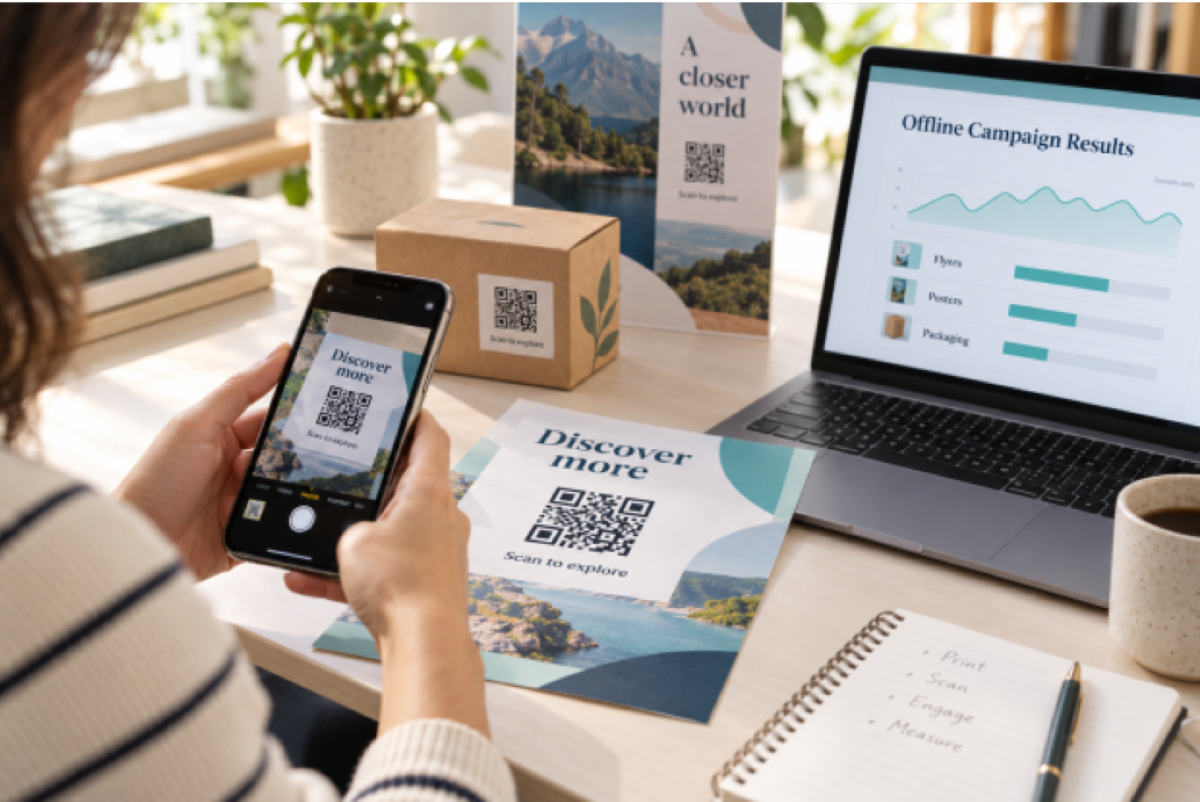
You can measure a flyer, a poster, or a product label almost as precisely as a Google ad. The tool is a QR code that records every scan, set up so each placement tells you something different.
Most businesses still treat print as a leap of faith. They know what a billboard or a box of flyers cost, but not what it returned. Digital channels, by contrast, report clicks, sessions, and sales down to the cent.
This guide shows how to close that gap. You will learn which kind of QR code to use, how to set up codes so the data is clean, which numbers matter, and how to turn scans into decisions.
Why Offline Marketing Is Hard to Measure
Offline marketing breaks the trail between seeing an ad and acting on it. A person reads your poster, remembers the brand, and types it into a search bar days later. In your analytics, that visit looks like organic or direct traffic.
The usual workarounds are weak. Discount codes printed on flyers get shared on coupon sites. “How did you hear about us?” surveys depend on memory. Vanity URLs work, but few people type a web address from a poster.
A QR code fixes the weak link. The scan is the action, it happens at the moment of interest, and it can be recorded automatically. The catch is that not every QR code can record anything.
Static vs Dynamic QR Codes for Measurement
Only a dynamic QR code can measure a campaign. A static code opens its destination directly, so no scan is ever counted. A dynamic code opens a short link first, which logs the scan, then forwards the person to your page in a fraction of a second.
| Static QR code | Dynamic QR code | |
|---|---|---|
| Counts scans | No | Yes |
| Location and device data | No | Yes |
| Change the link after printing | No | Yes |
| Best for | WiFi details, contact cards, fixed content | Campaigns, packaging, print ads |
The third row is the quiet bonus. If a landing page moves or a promotion ends, you can point the same printed code somewhere new. That protects your print budget as well as your data.
How to Set Up QR Codes You Can Measure
Clean data comes from setup, not from the dashboard. Follow these five steps before anything goes to print.
- Give every placement its own code. One code for the window poster, another for the table tent, another for the box insert. A single shared code tells you how many people scanned, but never where.
- Name each code by channel and place. Use a pattern like “Spring sale, flyer, Downtown store”. Months later, a name like “QR 7” is useless.
- Add UTM tags to the destination link. Tags such as utm_source=flyer and utm_medium=qr make these visits appear as their own channel in Google Analytics, so you can follow them to sign-ups and sales.
- Send people to a mobile page. Nearly every scan happens on a phone. A slow desktop page wastes the scan you worked to get.
- Test the printed proof. Scan it with two phones, confirm the scan appears in your dashboard, and check the page loads fast.
Most QR code tracking tools let you create, name, and compare codes like this in one dashboard, so a ten-placement campaign stays manageable.
Which Metrics Matter and How to Read Them
Five numbers tell you almost everything a QR campaign can. Read them together, never one at a time.
| Metric | What it tells you | Watch out for |
|---|---|---|
| Total scans | Overall interest in a placement | Repeat scans by the same person inflate it |
| Unique visitors | How many different people scanned | The truer measure of reach |
| Scans by location | Which store, city, or region responds | Location is approximate, not exact |
| Scans by time | Peak days and hours | Compare the same weekday, not any two days |
| Device and system | iPhone vs Android, browser | Test your page on the leading device |
Then connect scans to outcomes. Scans show interest; conversions show results. Your UTM tags let analytics count how many scanners signed up or bought, so you can work out cost per scan and cost per sale for each placement.
Turning Scan Data Into Decisions
Data only pays off when it changes what you print next. Here is a simple, illustrative example of how that works.
Imagine a bakery that prints three codes for a new loyalty offer: one on a window poster, one on counter cards, and one on takeaway bags. After four weeks, the dashboard shows the counter cards with about 400 scans, the bags with about 250, and the poster with about 40.
The decisions follow from the numbers:
- Cut the weak placement. The poster costs the most and returns the least, so the next print run drops it.
- Double down on the winner. Counter cards get a bolder call to action and a second location by the till.
- Fix timing. Scans peak on weekday mornings, so staff mention the offer during the morning rush.
- Change the offer, not the code. When the loyalty offer ends, the bakery points the same bag codes to its next promotion, with no reprint.
The same logic works for any business: compare placements, keep what scans, and move budget away from what does not.
Common Mistakes and a Note on Privacy
Most failed QR campaigns fail on basics, not technology.
- Using a static code. It scans fine and reports nothing. Check that the code is dynamic before printing.
- One code everywhere. Without separate codes, you cannot tell which placement worked.
- No call to action. “Scan for 10% off your next order” beats a bare code with no reason to scan.
- Printing too small. Around 2 by 2 cm is a common minimum for close-up scans; posters seen from a distance need much more.
- Judging too early. A week of data hides weekly patterns. Give a placement at least two to four weeks.
Scan tracking is generally aggregate. Tools record details like approximate city, device, and time, not a scanner’s name or email. Still, if you add advertising pixels to the destination page, mention them in your privacy notice and follow the rules where your customers live.
Conclusion
Offline marketing no longer has to be a guess. Use dynamic codes, give every placement its own code, tag your links, and read scans alongside sales.
Start small: pick one campaign, make a QR code online for each of three placements, and compare them after a month. The result will tell you more about your print budget than years of estimates.
Author Bio
Areeba Wasim is the Co-founder of IMQRScan, a QR code platform used by small businesses, marketers, and restaurants to create dynamic QR codes, track scans, and connect printed materials to online actions. He has built several SaaS tools for small businesses and writes about offline-to-online marketing, campaign measurement, and practical tools for growing businesses. Learn more at IMQRScan.