
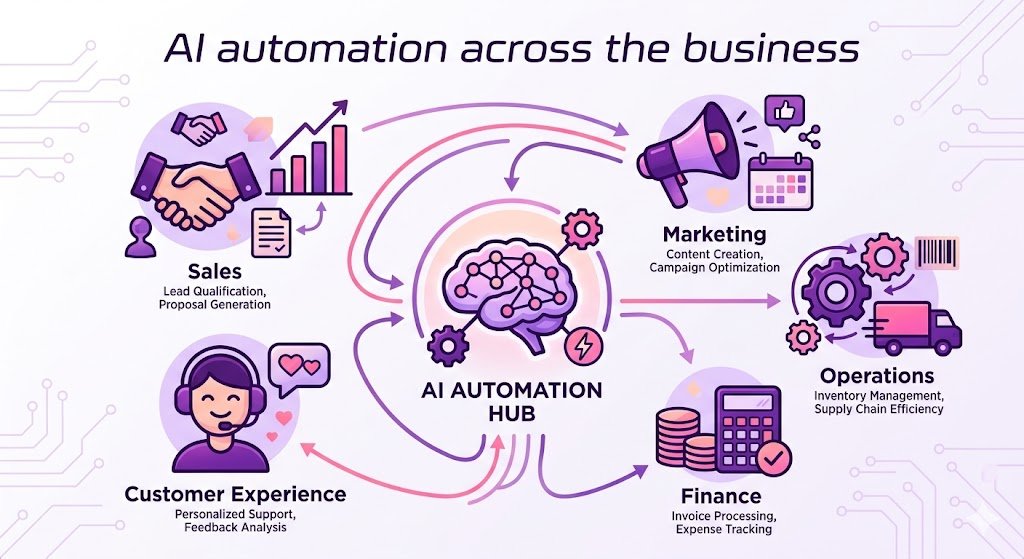
Modern businesses face growing pressure to complete tasks faster while maintaining accuracy and reducing operational costs. An effective AI Workflow Automation Guide helps organizations understand how artificial intelligence can automate repetitive work, improve productivity, and allow teams to focus on strategic initiatives. From small businesses to global enterprises, AI-powered workflow automation is transforming how work gets done.
This guide explains AI workflow automation, its benefits, practical use cases, implementation steps, and best practices for long-term success.
What Is AI Workflow Automation?
AI workflow automation is the process of using artificial intelligence technologies to automate business workflows that traditionally require human effort. Unlike conventional automation, AI can analyze information, recognize patterns, make predictions, and improve decision-making over time.
AI workflow automation combines technologies such as:
- Machine Learning (ML)
- Natural Language Processing (NLP)
- Intelligent Document Processing (IDP)
- Computer Vision
- Predictive Analytics
- Robotic Process Automation (RPA)
Together, these technologies create intelligent workflows that require minimal manual intervention.
Why Businesses Need AI Workflow Automation
Organizations are adopting AI workflow automation because manual processes often consume valuable time and resources.
Some major advantages include:
- Increased operational efficiency
- Faster task completion
- Reduced human errors
- Improved customer experiences
- Better compliance and reporting
- Lower operational costs
- Enhanced team productivity
- Scalable business operations
Instead of spending hours on repetitive administrative work, employees can focus on innovation, customer relationships, and strategic planning.
Key Components of AI Workflow Automation
Artificial Intelligence Engine
The AI engine processes information, identifies patterns, and learns from historical data to improve workflow decisions.
Workflow Automation Platform
This platform connects different applications, departments, and business processes into one automated system.
Data Integration
AI workflows rely on accurate data collected from CRMs, ERPs, cloud storage, emails, forms, and databases.
Decision Intelligence
AI can evaluate multiple variables before making recommendations or triggering automated actions.
Performance Monitoring
Analytics dashboards help organizations monitor workflow efficiency, identify bottlenecks, and continuously optimize automation.
Common AI Workflow Automation Use Cases
Customer Support Automation
AI chatbots answer common customer questions, route support tickets, and provide instant assistance 24/7.
Marketing Automation
Businesses automate:
- Email campaigns
- Lead nurturing
- Audience segmentation
- Social media scheduling
- Content recommendations
AI also predicts customer behavior to improve campaign performance.
Sales Workflow Automation
Sales teams use AI to:
- Score leads
- Schedule follow-ups
- Generate proposals
- Update CRM records
- Forecast revenue
This reduces administrative work and improves conversion rates.
Human Resources
HR departments automate:
- Resume screening
- Employee onboarding
- Leave management
- Performance evaluations
- Candidate communication
This speeds up hiring while improving employee experiences.
Finance and Accounting
AI simplifies financial workflows by automating:
- Invoice processing
- Expense approvals
- Fraud detection
- Payment reconciliation
- Financial reporting
These automated workflows improve both speed and accuracy.
Benefits of AI Workflow Automation
Increased Productivity
Routine work is completed automatically, allowing employees to dedicate more time to high-value projects.
Improved Accuracy
AI minimizes manual mistakes by consistently following predefined rules and learning from historical data.
Faster Decision-Making
AI analyzes large datasets in seconds, helping organizations respond quickly to changing business conditions.
Cost Savings
Reducing manual labor and minimizing errors lowers operational expenses across departments.
Better Customer Experience
Customers receive faster responses, personalized recommendations, and more consistent service.
Business Scalability
As organizations grow, AI automation handles increasing workloads without requiring proportional increases in staffing.
How to Implement AI Workflow Automation
Identify Repetitive Processes
Begin by listing routine tasks that consume significant employee time.
Examples include:
- Data entry
- Email responses
- Document approvals
- Report generation
- Customer inquiries
Set Clear Objectives
Define measurable goals such as:
- Reduce processing time
- Improve customer response rates
- Lower operational costs
- Increase productivity
- Enhance workflow visibility
Choose the Right AI Tools
Select automation platforms that integrate with your existing software while supporting future business growth.
Consider factors such as:
- Ease of use
- Integration capabilities
- Security
- Scalability
- Analytics features
Train AI Models
If your solution includes machine learning, provide quality training data so the AI can make accurate decisions.
Test Before Deployment
Run pilot projects to identify workflow issues before implementing automation across the organization.
Monitor and Improve
AI automation should evolve continuously. Regularly review workflow performance, collect feedback, and optimize processes.
Best Practices for Successful AI Workflow Automation
Start Small
Automate one department or workflow before expanding company-wide.
Maintain Data Quality
Clean, organized data improves AI accuracy and decision-making.
Involve Employees
Explain how automation supports employees rather than replacing them. Team participation improves adoption.
Monitor Performance Metrics
Track KPIs such as:
- Workflow completion time
- Error rates
- Customer satisfaction
- Cost savings
- Employee productivity
Prioritize Security
Protect sensitive business information with encryption, role-based access controls, and compliance policies.
Common Challenges
Although AI workflow automation offers many benefits, organizations should prepare for potential challenges.
Integration Complexity
Older software systems may require additional configuration before connecting with AI platforms.
Employee Resistance
Some employees may hesitate to adopt new technology. Proper training and communication help ease the transition.
Data Privacy
Businesses must comply with data protection regulations while handling customer information responsibly.
Initial Investment
Implementation costs can be significant, but long-term productivity gains often provide a strong return on investment.
Future Trends in AI Workflow Automation
AI workflow automation continues to evolve rapidly. Emerging trends include:
- Generative AI for business processes
- Autonomous AI agents
- Hyperautomation strategies
- Predictive workflow optimization
- Intelligent process mining
- AI-powered decision support
- Voice-controlled workflow management
- Advanced business intelligence integration
These innovations will create smarter workflows capable of adapting automatically to changing business environments.
Conclusion
An effective AI Workflow Automation Guide empowers organizations to improve efficiency, reduce manual work, and make smarter business decisions. By combining artificial intelligence with automated workflows, businesses can streamline operations, enhance customer experiences, and remain competitive in an increasingly digital marketplace.
Whether you’re automating customer support, marketing, finance, sales, or human resources, success begins with identifying repetitive tasks, selecting the right AI tools, and continuously refining your workflows. As AI technology advances, workflow automation will become an essential strategy for organizations seeking sustainable growth, improved productivity, and long-term operational excellence.








2 thoughts on “AI Workflow Automation Guide”