Artificial intelligence is transforming the way businesses operate by automating repetitive tasks, improving decision-making, and increasing overall efficiency. However, implementing AI successfully requires more than simply choosing the right software. A structured AI workflow automation implementation checklist helps organizations avoid common mistakes, streamline deployment, and maximize return on investment.
Whether you’re introducing AI automation into customer support, marketing, finance, human resources, or operations, following a well-planned implementation process ensures smoother adoption and long-term success. This guide provides a practical checklist that businesses of all sizes can use to build effective AI-powered workflows.
What Is AI Workflow Automation?
AI workflow automation combines artificial intelligence with business process automation to execute tasks with minimal human intervention. Unlike traditional automation, AI can analyze data, recognize patterns, make predictions, and continuously improve its performance through machine learning.
Businesses use AI workflow automation to automate activities such as:
- Customer support
- Lead management
- Invoice processing
- Employee onboarding
- Email automation
- Data entry
- Document processing
- Marketing campaigns
- Inventory management
A successful implementation begins with careful planning rather than rushing into deployment.
Why an AI Workflow Automation Checklist Matters
Many AI projects fail because organizations focus only on technology while overlooking strategy, data quality, employee training, and workflow optimization.
A structured implementation checklist helps organizations:
- Reduce deployment risks
- Improve project planning
- Increase employee adoption
- Ensure data accuracy
- Measure automation performance
- Maximize operational efficiency
- Achieve faster ROI
With a clear roadmap, businesses can implement AI confidently and avoid costly setbacks.
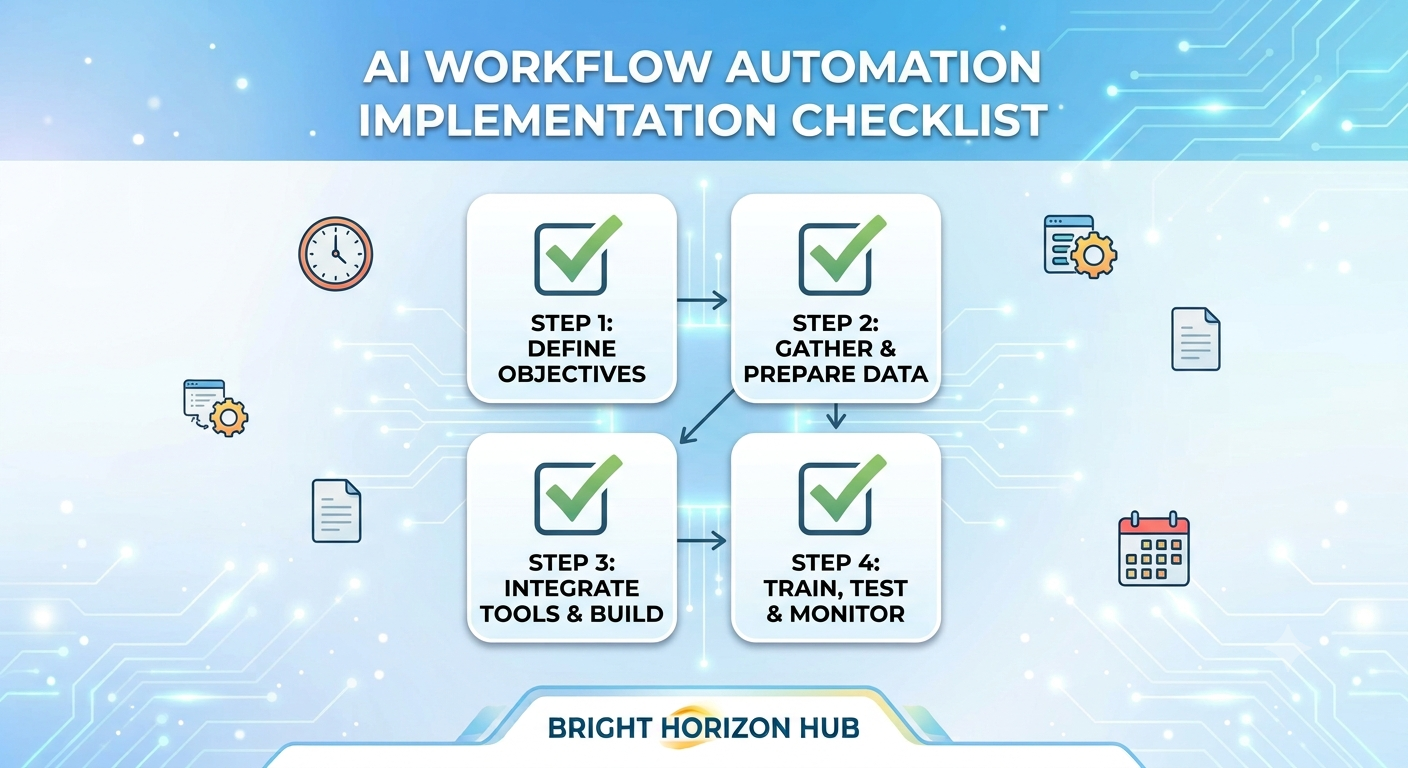
AI Workflow Automation Implementation Checklist
1. Define Your Business Objectives
Before selecting any AI solution, identify what you want to accomplish.
Ask questions such as:
- Which business problems need solving?
- Which repetitive tasks consume the most time?
- What outcomes are expected?
- How will success be measured?
Clear goals keep the implementation focused and measurable.
2. Identify Processes Suitable for Automation
Not every workflow should be automated. Start with repetitive, rule-based tasks that require minimal human judgment.
Ideal candidates include:
- Email responses
- Customer ticket routing
- Invoice approvals
- Appointment scheduling
- Data synchronization
- Report generation
- Lead qualification
Beginning with simple workflows allows teams to gain confidence before automating more complex processes.
3. Evaluate Existing Workflows
Analyze your current business processes before introducing AI.
Look for:
Bottlenecks
Identify delays caused by manual work.
Repetitive Activities
Pinpoint tasks employees perform repeatedly throughout the day.
Error-Prone Processes
Determine where human mistakes frequently occur.
Optimizing existing workflows before automation often delivers better results.
4. Choose the Right AI Automation Platform
Selecting the right software is one of the most important decisions.
Look for platforms that provide:
- No-code or low-code workflow builders
- AI-powered automation
- Easy integrations
- Scalable architecture
- Strong security features
- Analytics dashboards
- Workflow templates
The ideal platform should align with your organization’s size, budget, and technical expertise.
5. Prepare High-Quality Data
Artificial intelligence relies heavily on accurate data.
Before implementation:
- Remove duplicate records
- Correct outdated information
- Standardize formats
- Fill missing values
- Validate customer and business data
Clean data significantly improves AI performance and decision-making.
6. Integrate Existing Business Systems
AI automation performs best when connected with existing software.
Common integrations include:
- CRM systems
- ERP software
- Email platforms
- Project management tools
- Customer support software
- Accounting applications
- Cloud storage solutions
Smooth integrations reduce manual data transfers and improve workflow efficiency.
7. Design the Automation Workflow
Map each step before building your automation.
Define:
- Workflow triggers
- Decision points
- AI actions
- Notifications
- Human approvals
- Exception handling
- Final outcomes
Visual workflow diagrams help teams understand how automation will function.
8. Test Before Launch
Never deploy automation without testing.
Run multiple scenarios to verify:
- Workflow accuracy
- AI recommendations
- System integrations
- Error handling
- Processing speed
- User experience
Testing reduces disruptions after deployment.
9. Train Employees
Successful AI implementation depends on user adoption.
Provide training on:
Using AI Tools
Teach employees how automated workflows operate.
Human Oversight
Explain when manual intervention is necessary.
Troubleshooting
Prepare users to identify and resolve common workflow issues.
Employee confidence greatly improves automation success.
10. Monitor Performance Metrics
After deployment, continuously evaluate workflow performance.
Track important KPIs such as:
- Time saved
- Automation rate
- Cost reduction
- Customer satisfaction
- Employee productivity
- Error reduction
- Workflow completion time
Performance monitoring helps identify opportunities for continuous improvement.
Best Practices for AI Workflow Automation
Following proven strategies increases long-term success.
Start Small
Begin with one department or workflow before expanding across the organization.
Keep Humans Involved
AI should support employees rather than replace critical decision-making.
Update Workflows Regularly
Business requirements change over time, so automation should evolve accordingly.
Maintain Data Security
Protect customer information by implementing strong access controls, encryption, and compliance policies.
Gather User Feedback
Employees often identify workflow improvements that enhance automation performance.
Common Implementation Challenges
Despite its advantages, AI workflow automation presents several challenges.
Poor Data Quality
Incomplete or inaccurate data leads to unreliable AI outputs.
Employee Resistance
Staff may hesitate to adopt new technology without proper communication and training.
Integration Difficulties
Older software systems sometimes require additional configuration before connecting with AI platforms.
Unrealistic Expectations
AI improves efficiency but does not eliminate every manual process. Setting realistic goals helps maintain stakeholder confidence.
Future of AI Workflow Automation
AI automation is becoming increasingly intelligent through advances in generative AI, predictive analytics, and autonomous decision-making.
Future implementations will include:
- AI-powered workflow optimization
- Voice-controlled automation
- Predictive business processes
- Intelligent document understanding
- Hyper-personalized customer interactions
- Self-improving workflows
Organizations that build strong automation foundations today will be better positioned to benefit from these emerging innovations.
Conclusion
A structured AI workflow automation implementation checklist provides businesses with a practical roadmap for deploying AI successfully. From defining business objectives and preparing clean data to selecting the right platform, training employees, and monitoring performance, every step plays a vital role in long-term success.
Rather than automating every process at once, organizations should begin with high-impact workflows, measure results carefully, and expand gradually. With thoughtful planning and continuous optimization, AI workflow automation can reduce operational costs, improve productivity, enhance customer experiences, and create a more agile, data-driven business.