

Administrative work is necessary for every business, but it does not have to consume most of the working day. Data entry, scheduling, email management, document organization, invoicing, reporting, and repetitive communication can quietly drain employee productivity.
Fortunately, businesses no longer need expensive enterprise systems to reduce this burden. Affordable digital tools, cloud software, automation platforms, and artificial intelligence can handle many routine administrative tasks at a relatively low cost.
For startups, freelancers, and small businesses, adopting low-cost technology for reducing admin work can improve efficiency without requiring a large technology budget.
Why Businesses Should Reduce Administrative Work
Administrative tasks often appear small individually. The problem is their cumulative impact.
An employee might spend a few minutes entering customer information, another few minutes responding to routine emails, and additional time updating spreadsheets. Over weeks and months, these activities can represent hundreds of hours of lost productivity.
Reducing unnecessary manual work allows employees to spend more time on sales, customer relationships, strategic planning, and other activities that directly contribute to business growth.
The objective is not to eliminate administration completely. Instead, businesses should automate repetitive work while keeping people involved where judgment and personal interaction are important.
Affordable Technology for Administrative Automation
Modern businesses have access to several inexpensive technologies that can simplify everyday operations.
Cloud-Based Productivity Tools
Cloud productivity software can replace many manual processes involving documents, spreadsheets, calendars, and file sharing.
Employees can collaborate on documents in real time instead of emailing multiple versions back and forth. Shared calendars can reduce scheduling conflicts, while cloud storage makes important files easier to organize and access.
For small businesses, these tools can create a more structured digital workplace without requiring expensive servers or complicated infrastructure.
Automated Scheduling Software
Scheduling meetings manually can create unnecessary email exchanges.
Affordable scheduling platforms allow customers, employees, or business partners to select available time slots. The system can automatically create calendar events and send reminders.
This simple form of administrative task automation can save significant time for consultants, sales teams, agencies, and service businesses.
Digital Forms and Data Collection
Paper forms and manual data entry are common sources of administrative inefficiency.
Online forms allow businesses to collect customer information, employee requests, feedback, applications, and other data digitally.
Responses can often be transferred automatically into spreadsheets or databases, eliminating the need to manually retype information.
Using AI to Reduce Routine Office Work
Artificial intelligence is becoming increasingly accessible to small businesses.
AI Email Assistance
Employees often spend substantial time writing repetitive emails. AI writing assistants can help draft responses, summarize long messages, improve wording, and organize information.
For example, a business can use AI to create a first draft of a routine customer response. An employee can then review and personalize it before sending.
This approach saves time while maintaining human oversight.
AI Document Processing
Businesses frequently receive invoices, applications, contracts, receipts, and other documents.
AI-powered document processing can extract relevant information from files and convert unstructured documents into organized data.
This can reduce manual data entry and make document management more efficient.
AI Meeting Summaries
Meetings often create additional administrative work because someone has to record notes, identify action items, and distribute follow-up information.
AI meeting assistants can generate summaries, identify important discussion points, and create action-item lists.
Employees can therefore spend more time participating in meetings instead of worrying about documentation.
Workflow Automation Without Expensive Software
Workflow automation does not always require custom software development.
Affordable automation platforms can connect common business applications and trigger actions automatically.
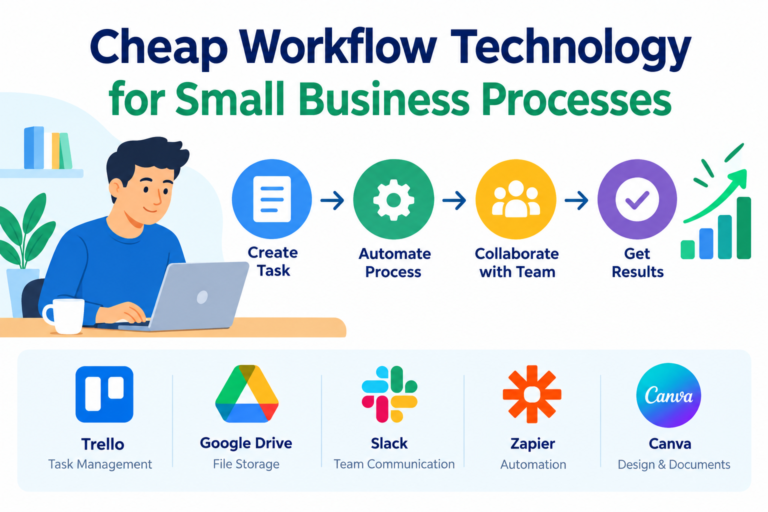
For example, when a customer completes an online form, an automated workflow could add the information to a spreadsheet, notify a team member, create a task, and send a confirmation email.
This type of low-cost workflow automation eliminates several manual steps from a single process.
Start With Simple Workflows
Businesses should begin with repetitive processes that have clear rules.
Examples include:
- New customer notifications
- Appointment reminders
- Invoice follow-ups
- Employee onboarding tasks
- Form-to-spreadsheet data transfer
- Internal task assignments
- Routine email notifications
Simple workflows are easier to automate and easier to measure.
Digital Invoicing and Expense Management
Financial administration can consume considerable time, particularly for small businesses.
Digital invoicing software can generate invoices, track payment status, send reminders, and organize financial records.
Expense management tools can also help employees submit receipts electronically instead of maintaining paper records.
These systems can improve record keeping while reducing repetitive bookkeeping tasks.
Better File and Document Management
Searching for files is an underestimated productivity problem.
A structured cloud-based document management system can organize contracts, invoices, reports, employee documents, and project files in clearly defined folders.
Consistent naming conventions and access permissions make information easier to find.
Businesses should also avoid keeping important documents across random personal devices, email inboxes, and messaging applications.
Communication Automation
Routine internal and external communication can often be simplified.
Businesses can create reusable email templates for common requests, customer questions, appointment confirmations, payment reminders, and onboarding instructions.
Automated notifications can also keep employees informed when specific events occur.
The goal is not to make communication robotic. Instead, automation should handle predictable messages so employees can focus on conversations that require a personal response.
How to Choose Low-Cost Technology
The cheapest tool is not necessarily the best choice.
Before purchasing software, businesses should consider the time saved, ease of implementation, integration capabilities, security, scalability, and total cost.
A free tool that requires hours of manual maintenance may be more expensive in practice than an affordable paid solution that automates the entire workflow.
Businesses should also avoid buying multiple applications that perform overlapping functions.
A Practical Implementation Strategy
Start by listing administrative activities performed every week.
Next, estimate how much time employees spend on each activity. Identify processes that are repetitive, predictable, and relatively easy to standardize.
Choose one high-impact process for automation.
After implementation, compare the new process with the original workflow. Measure time savings, error reduction, employee adoption, and overall cost.
If the results are positive, move to the next process.
Conclusion
Low-cost technology for reducing admin work is no longer limited to large corporations with significant IT budgets. Small businesses can use cloud software, AI assistants, digital forms, scheduling tools, workflow automation, and online invoicing systems to reduce repetitive administrative tasks.
The key is to automate strategically rather than buying technology without a clear purpose.
Businesses that identify their biggest administrative bottlenecks and address them one at a time can save valuable hours, reduce errors, and create more productive workplaces. The best technology is not necessarily the most advanced—it is the technology that removes unnecessary work while making business operations simpler.








One thought on “Low-Cost Technology for Reducing Admin Work: Practical Solutions for Small Businesses”