

Running a business with limited funds does not mean sacrificing productivity, security, or growth. The right technology can help small companies manage daily operations, serve customers, and compete more effectively without overspending. Affordable technology solutions include budget-friendly software, cloud services, automation tools, and digital communication platforms designed to simplify business tasks.
By choosing cost-effective business software, companies can reduce repetitive work, improve team collaboration, and control operating expenses. However, selecting tools based only on low prices can lead to hidden costs and unnecessary complexity. This guide explores practical options, important features, and smart purchasing strategies to help businesses invest in technology that delivers genuine value.
Why Affordable Business Technology Matters
Small businesses need to make every investment count. Spending too much on technology can reduce cash flow, while avoiding digital tools entirely can create unnecessary work and limit growth.
Affordable business technology helps companies find a balance between cost and performance.
For example, a small retailer can use cloud-based inventory software instead of maintaining expensive computer systems. A freelancer can manage projects through a free productivity application rather than purchasing complex enterprise software.
The objective is not to adopt every new technology. It is to identify tools that solve genuine business problems and provide measurable value.
1. Use Free and Low-Cost Cloud Software
Cloud computing is one of the most practical technology solutions for businesses with limited budgets. It allows companies to access software, store files, and collaborate online without investing heavily in physical infrastructure.
Many cloud platforms offer free plans or affordable subscriptions designed for small teams.
Cloud Storage and File Management
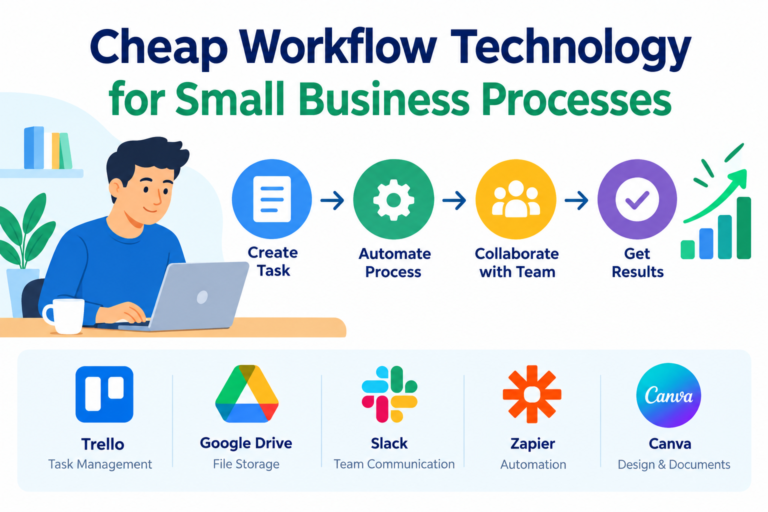
Services such as Google Drive, Microsoft OneDrive, and Dropbox help businesses store documents, share files, and collaborate with employees or clients.
Cloud storage reduces dependence on physical storage devices and makes important information accessible from different locations.
Before choosing a platform, businesses should compare storage limits, security features, collaboration options, and subscription costs.
Affordable Accounting Software
Managing finances manually can consume valuable time and increase the risk of errors.
Low-cost accounting applications help businesses track income, expenses, invoices, and financial records. Some also support expense categorization and financial reporting.
Choosing an accounting solution that matches the company’s current needs can reduce administrative work without requiring a full-time accounting department.
2. Automate Repetitive Business Tasks
Business automation allows small teams to accomplish more without increasing their workload.
Many everyday activities, including appointment reminders, email responses, invoice notifications, and customer follow-ups, can be automated using affordable software.
Start With Simple Workflow Automation
Small businesses can use automation tools to connect applications and transfer information automatically.
For example, when a customer submits a website form, an automated workflow can send a confirmation email and add the customer’s information to a contact list.
This reduces manual data entry and helps businesses respond more consistently.
Explore Affordable AI Tools
Artificial intelligence can support content creation, customer communication, research, and administrative tasks.
AI writing assistants can help prepare email drafts, summarize documents, and generate initial content ideas. AI chatbots can also answer routine customer questions when properly configured.
However, businesses should review AI-generated information before using it. Free tools are useful starting points, but sensitive business information should only be shared with services that meet appropriate privacy and security requirements.
3. Choose Open-Source Business Software
Open-source software can provide powerful features without expensive licensing fees.
These applications allow users to access and, depending on the license, modify their source code. They can be particularly useful for businesses that have technical expertise or access to affordable IT support.
Website and Content Management
Open-source content management systems such as WordPress can help businesses create professional websites without paying for proprietary website software.
Businesses can use their websites to publish articles, showcase services, generate leads, and communicate with customers.
Although the software may be free, companies should budget for hosting, domain registration, maintenance, security, and any premium extensions they require.
Project Management and Collaboration
Open-source project management tools can help teams organize tasks, monitor deadlines, and manage responsibilities.
Before adopting one, businesses should evaluate its ease of use, support options, hosting requirements, and compatibility with existing workflows.
The cheapest software is not always the best choice if it requires extensive technical maintenance.
4. Improve Customer Relationships With Affordable CRM Tools
Customer relationship management (CRM) software helps businesses organize customer information, track sales opportunities, and manage communication.
For small businesses, even a basic CRM system can make a significant difference.
Organize Customer Information
Instead of keeping customer details in scattered spreadsheets and email accounts, businesses can use a CRM platform to maintain a centralized contact database.
This makes it easier to follow up with potential customers, remember previous conversations, and identify opportunities for repeat business.
Many CRM providers offer free entry-level plans. Businesses should compare contact limits, automation features, reporting options, and user restrictions before choosing a solution.
Use Email Marketing to Build Relationships
Affordable email marketing software allows businesses to send newsletters, product updates, and promotional messages to interested customers.
A well-organized email list can help companies maintain customer relationships without relying entirely on paid advertising.
The key is to provide useful information and communicate with people who have agreed to receive marketing messages.
5. Adopt Affordable Cybersecurity Solutions
Cybersecurity is not an optional expense, even for businesses with limited budgets. A security incident can result in lost information, financial damage, and disrupted operations.
Fortunately, basic security measures are often affordable and highly effective.
Protect Business Accounts and Devices
Small businesses should prioritize strong, unique passwords and enable multi-factor authentication wherever possible.
Password managers can help employees manage login credentials securely without relying on written notes or reused passwords.
Keeping operating systems, applications, and website software updated also reduces exposure to known security vulnerabilities.
Back Up Important Business Data
Regular backups protect essential information against accidental deletion, hardware failure, and certain cyberattacks.
Businesses should maintain secure backups of financial records, customer information, website files, and important documents.
A practical backup strategy should include regular testing to confirm that the data can actually be restored when needed.
6. Use Digital Marketing Instead of Expensive Advertising
Traditional advertising can be expensive, particularly for startups and small companies that have not established a reliable customer base.
Digital marketing offers more flexible ways to reach potential customers and measure campaign performance.
Build a Search Engine Optimized Website
Search engine optimization (SEO) helps businesses improve their visibility in search results.
A well-structured website with useful content, relevant keywords, descriptive page titles, and clear navigation can attract people who are actively searching for particular products or services.
Businesses can begin with affordable SEO tools, website analytics, and consistent content publishing rather than immediately investing in expensive marketing platforms.
However, SEO requires time and ongoing improvement. Publishing content alone does not guarantee higher rankings or traffic.
Promote Products Through Social Media
Social media platforms provide opportunities to connect with customers, share updates, and demonstrate products.
Free design tools can help businesses create promotional graphics, while scheduling applications can simplify content planning.
Rather than maintaining every social platform, businesses should focus on the channels where their target customers are most active.
7. Make Smart Technology Investments
Affordable technology is not simply about choosing the lowest price. Businesses must consider the total cost of ownership, including subscriptions, training, maintenance, and future upgrades.
A tool that saves money initially may become expensive if it requires constant troubleshooting or does not support business growth.
Evaluate Technology Before Purchasing
Before investing in new software or equipment, ask these questions:
- What specific business problem will this technology solve?
- Is there a free or lower-cost alternative?
- Will employees need additional training?
- Does the solution integrate with existing systems?
- Can the business upgrade when its requirements change?
A short trial period can help businesses determine whether a tool provides genuine value before committing to a paid subscription.
8. Create a Practical Technology Budget
A technology budget helps businesses control spending while ensuring that essential systems receive sufficient attention.
Start by identifying the tools currently being used and reviewing their monthly costs. Remove unused subscriptions and duplicate applications.
Next, prioritize investments according to their expected business impact.
For example, a small online store might prioritize secure payment processing, inventory management, and website performance before purchasing advanced analytics software.
Businesses should also maintain a small reserve for unexpected technical problems, essential upgrades, and data recovery.
Conclusion
Technology solutions for businesses with limited budgets can improve productivity, customer service, and operational efficiency without requiring major financial investments.
Cloud software, workflow automation, open-source applications, affordable CRM systems, cybersecurity tools, and digital marketing platforms offer practical opportunities for small businesses to compete more effectively.
The most successful approach is to start with essential needs, choose reliable tools, and measure their results.
Affordable technology works best when it solves real problems, supports business goals, and delivers value over time. By making careful decisions and avoiding unnecessary subscriptions, businesses can build efficient digital operations while protecting their limited budgets.








2 thoughts on “Affordable Technology Solutions for Businesses on Tight Budgets”